An avatar ai video maker for business advertising turns a written script into a presenter-led ad in minutes, so teams test hooks, localize spots and refresh seasonal creative without booking a shoot.
Quick steps
Everything below assumes you already have a product, an offer and a landing page that converts. The avatar is a delivery mechanism, not a strategy.
- Write three ad scripts of 60–90 words each, changing only the opening hook.
- Render all three with the same avatar and the same voice, so the hook stays the only variable.
- Cut 4–6 seconds of real product or screen footage into the middle of each script.
- Switch on the platform’s AI-content disclosure before upload, and file the consent paperwork for any cloned face or voice.
- Launch the three as one ad set on equal budget, then read hook rate and cost per acquisition after a week.
Each of those is an afternoon of work, not a production cycle. The expensive part of advertising video has rarely been the camera; it is talent booking, scheduling, and the reshoot that follows when legal rewrites a claim. An avatar maker deletes the scheduling problem, which is why performance teams usually adopt it before training teams do.
What an avatar AI video maker does inside an ad workflow
You paste a script, choose a presenter and a voice, and the system renders a lip-synced talking-head video with captions, in whatever aspect ratio the placement needs. Most tools also accept a topic prompt, a product URL or an uploaded deck instead of a finished script. The output arrives as an MP4 you drop into your editor like any other clip.
Adoption is no longer experimental at the top end: Synthesia reports that more than 1 million people at over 60,000 businesses use the platform, including 90% of the Fortune 100 and 70% of the FTSE 100.
What it handles well:
- Talking-head hooks and voiceover for a 15–30 second ad
- Claim swaps, price swaps and offer swaps across many versions
- Language versions of one approved script
- Vertical, square and landscape cuts of the same take
What it does not handle:
- The product actually in someone’s hands, with texture and motion
- Genuine customer testimonials, which carry legal weight
- Physical demonstrations, stunts and anything that must look unstaged
Treat the avatar as the anchor of the ad and real footage as the proof. If the avatar is carrying the whole 30 seconds alone, it is worth reading up on how to make AI videos that hold up under scrutiny before you spend media budget.
Six ways businesses are already using AI avatar ads
- Hook testing. Ten openings, one body, one offer — the cheapest way to find the sentence that stops the scroll.
- Product demos and explainers. The avatar narrates while screen capture or product footage fills the frame.
- Localized spots. One approved script becomes a Spanish, German and Japanese version; AI Studios supports text-to-speech voiceovers in 150+ languages and accents on its paid plans, and 30+ languages on the Free plan.
- Retargeting sequences. Viewer saw the hook ad, bounced, and now gets a 12-second objection-handler built from the same avatar and brand frame.
- Seasonal refreshes. Same script skeleton, new dates, new discount, new background — shipped the morning the promo calendar changes.
- Sales outreach. Short avatar videos in cold email and LinkedIn, personalized by account segment rather than one by one, a pattern close to how B2B explainer videos work across the sales cycle.
Generative tools inside ad platforms have scaled alongside standalone avatar makers. Meta said more than 4 million advertisers were using its generative AI ad tools for image, video and text as of its Q4 2024 earnings call in January 2025, according to Marketing Dive. That matters for your expectations: the volume advantage you gain is increasingly the baseline, not an edge.
Scenario: a 12-person DTC skincare brand ships 20 ad variants in a week
Example: a direct-to-consumer skincare brand with 12 staff, one in-house marketer, no videographer, launching a barrier-repair serum.
Monday. The marketer writes five hook lines and one 70-word body script. Legal approves the claim language in a single pass because everything sits in a doc, not in a shot list.
Tuesday. She records 90 seconds of b-roll on a phone: the pump, the texture on a forearm, the jar on a windowsill. That is the only filming in the whole week.
Wednesday. She builds the avatar takes. A platform such as AI Studios, DeepBrain AI’s cloud tool for avatar video, text-to-video and translation, can generate from a script, a topic prompt, a web URL, an uploaded document or a product page — so the serum’s product page becomes the first draft script.
Thursday. Four hooks × five body-and-offer combinations = 20 cuts in the editor, each with the same b-roll and captions.
Friday. Upload, label as AI-generated, launch as two ad sets, equal budget.
The limitation worth knowing before you plan: unlimited custom avatars and bulk video generation sit on the Enterprise plan, which uses custom pricing, and interactive live avatars are billed separately — a Free tier with 2 credits and a Standard tier at $99 per month with 100 credits, at 1 credit per 5 minutes.
Before vs after: three-week shoot cycle vs two-day avatar cycle
| Stage | Traditional shoot | Avatar cycle |
|---|---|---|
| Script lock | Before booking talent | Morning of day one |
| Talent | Casting, day rate, usage rights | Stock avatar or licensed clone |
| Filming | One studio day, fixed date | Phone b-roll only |
| Variants | Limited to what was shot | Limited by credits |
| Claim rewrite | Reshoot or voiceover patch | Edit text, re-render |
| First performance data | After the edit is delivered | Day two |
Those durations are planning estimates for the example brand above, not measured research. Your own before-and-after will hinge on approval speed more than render speed.
The real shift is where risk sits. In a shoot cycle, a rejected claim costs you a reshoot; in an avatar cycle, it costs you a text edit and twenty minutes of rendering. That single change is why small teams can keep testing through a quarter instead of resting on one hero film.
One honest trade-off: the shoot gives you footage you can reuse for years across packaging, PR and the site. Avatar renders are disposable by design, and they age with the model that made them.
Step-by-step: build, label and launch your first avatar ad test
- Pick one offer. Not a brand film. A single product, a single promise, a single landing page.
- Write the body once. Keep it under 90 words and read it aloud; synthetic voices expose clumsy sentences fast.
- Write three hooks. One problem-first, one result-first, one question. Nothing else changes.
- Choose one avatar and one voice and stick with them for the whole test, so you are measuring the words.
- Render all three at the aspect ratio your placement actually uses — vertical for Reels, Shorts and TikTok.
- Add proof footage in the middle 6 seconds: hands, texture, screen, packaging.
- Burn in captions and check the first frame reads as a brand, not a floating head.
- Set the AI disclosure control on every platform before publishing, and store your consent record for any cloned likeness.
- Launch as one ad set, equal budget, and leave it alone for at least a week.
The assembly order matters more than the tool. For the longer version of this pipeline, including storyboard and audio cleanup, see this walkthrough of the full AI video workflow from script to finished avatar video.
What results to expect, and how to measure them honestly
Expect speed gains first and performance gains second. The metrics that move earliest are the ones tied to the opening seconds and to volume of tests, not to conversion rate.
Watch these, in this order:
- Hook rate (3-second views ÷ impressions) — the only honest read on whether the avatar’s first line works
- Hold rate to 15 seconds — tells you if the synthetic voice is tiring people out
- Click-through rate — tests the offer, not the presenter
- Cost per acquisition and ROAS — the decision metric, read on at least a week of data
- Frequency — avatar fatigue shows up here before it shows up in CPA
Three cautions. Shipping 20 variants splits your budget 20 ways, so most variants will never reach significance; group them into three or four buckets instead. Comparing a new avatar ad against last quarter’s creative with a different offer tells you nothing. And in categories built on texture, sound or trust — food, beauty application, before-and-after — a scrappy phone video from a real customer still frequently outperforms a polished avatar.
What it costs: plan limits, credits and price per finished ad minute
Credits, not minutes, are the unit you buy. Synthesia’s Starter plan costs $29 per month and includes 1,250 credits, which covers roughly 12 minutes of video creation or 16 minutes of dubbing, according to Synthesia’s pricing page. Its most popular paid tier, Pro, is $89 per month for 6,000 credits, equal to about 60 minutes of video or 78 minutes of dubbing per month.
HeyGen’s entry-level Creator plan includes 600 credits per month for $29 per month, per HeyGen’s help center. HeyGen’s Pro plan scales from 1,000 credits a month at $49 up to 100,000 credits a month at $4,300, so high-volume ad testing has a published ceiling price you can budget against.
To get your true cost per finished ad minute, add four things:
- The monthly plan fee divided by the minutes that plan actually covers
- Re-renders — budget for at least two per finished ad
- Editing time to cut b-roll, captions and the end card
- One-off setup such as voice cloning or a custom avatar
Re-renders are where teams overspend. Lock the script before you render, not after.
Disclosure and consent: FTC rules, platform labels and the EU AI Act
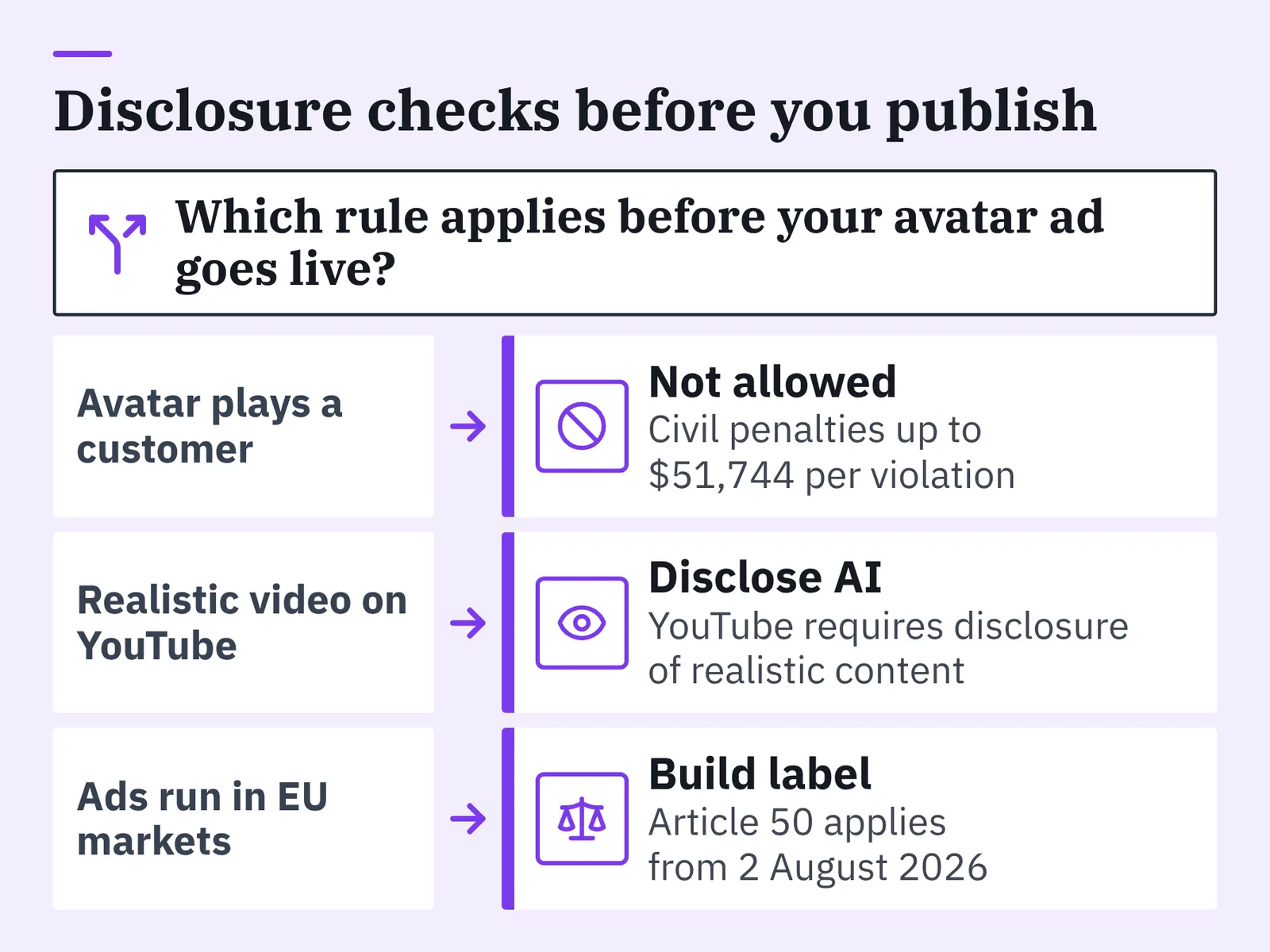
In the United States, the Federal Trade Commission announced a final rule on August 14, 2024 prohibiting fake and AI-generated consumer reviews, consumer testimonials and celebrity testimonials. That rule took effect on October 21, 2024, and the agency can seek civil penalties of up to $51,744 per violation. The practical line for advertisers: an avatar may present your claims, but it must not play a customer giving a testimonial.
Platform rules sit on top of that. YouTube requires creators to disclose content that is generated or meaningfully altered with AI whenever it appears realistic, which covers avatar-led ads uploaded as videos or Shorts.
In the EU, Article 50 of the AI Act applies from 2 August 2026, and since that date providers and deployers of AI systems must meet its transparency obligations, including deepfake disclosure. If you run ads into EU markets, build the label into your publishing checklist rather than handling it case by case.
Consent is the other half. Voice cloning — creating a custom AI voice from a short recording, as AI Studios supports — needs written permission from the person whose voice it is, kept on file with the dates and scope of use. Security paperwork helps in regulated accounts: AI Studios lists ISO 27001 certification, SOC 2 Type II compliance and GDPR compliance, and is a member of the Content Authenticity Initiative.
This is general information about advertising and AI disclosure rules, not legal advice; rules differ by state and by country, so check with counsel before you launch in a new market.
When an avatar ad is the wrong tool
Skip the avatar when the ad depends on something a synthetic presenter cannot provide:
- Real testimonials. Covered by the FTC rule above. Film the actual customer or use written, verifiable reviews.
- Texture and sensory proof. Food pull-shots, cream absorbing into skin, fabric drape. Shoot it on a phone in daylight.
- Founder credibility. A rough founder-to-camera clip beats a polished stranger in categories that run on trust.
- Comedy and timing. Synthetic delivery still flattens punchlines.
- Live reactions and events. Nothing synthetic reads as spontaneous.
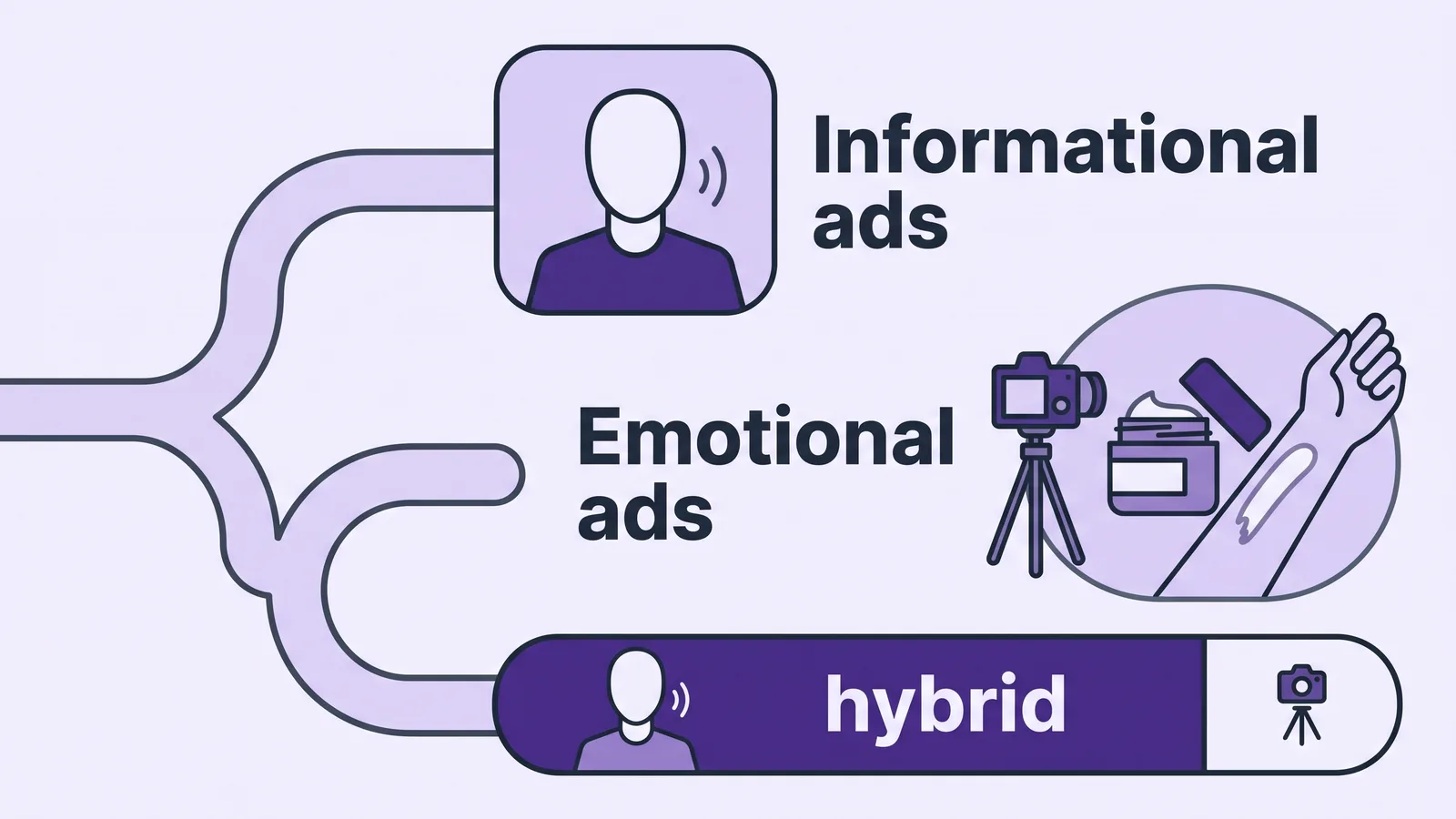
The decision usually comes down to whether the ad’s value is in information or in presence. Informational ads — pricing, features, comparisons, how-it-works — survive an avatar perfectly well, and the trade-offs are laid out in this piece on when an AI spokesperson beats filming a presenter. Emotional ads usually need a human on camera, even a shaky one.
A hybrid works more often than either extreme. Let the avatar carry the script and the structure, then hand the last five seconds to real footage of the product doing its job.
Frequently asked questions
How much does it cost to run an avatar ad test for a month?
Entry plans are affordable enough for a single test cycle: Synthesia’s Starter plan costs $29 per month and includes 1,250 credits, roughly 12 minutes of video creation, while HeyGen’s Creator plan includes 600 credits per month for $29 per month. Add editing time and re-renders to get your real cost.
Do I have to label an avatar ad as AI-generated?
On YouTube, yes — the platform requires creators to disclose content that is generated or meaningfully altered with AI whenever it appears realistic, which includes avatar-led ads as videos or Shorts. In the EU, Article 50 of the AI Act applies from 2 August 2026 with transparency obligations including deepfake disclosure. This is general information, not legal advice.
Can an AI avatar deliver a customer testimonial?
No. The US Federal Trade Commission announced a final rule on August 14, 2024 prohibiting fake and AI-generated consumer reviews, consumer testimonials and celebrity testimonials, and the agency can seek civil penalties of up to $51,744 per violation under that rule. Use the avatar to present your own claims, and film real customers for testimonials.
How many ad variants should I actually launch at once?
Three to five per ad set is usually the useful ceiling, even though the tool can render twenty. Splitting budget across twenty variants means none of them collects enough data to judge, so group similar cuts into buckets and test one variable — typically the hook — at a time.
Will avatar ads outperform the UGC videos I already run?
Not reliably, and you should not plan on it. Avatar ads win on speed, language coverage and claim-change cost; real customer footage usually wins in categories built on texture, sound or trust. Expect to use avatars for informational and localized placements, and keep shooting UGC for sensory proof.
Sources
- Synthesia Pricing – Compare Free and Paid Plans
- What is Synthesia? — Synthesia Help Center
- HeyGen Credit-Based Pricing Plans & Subscriptions Explained
- HeyGen — Pricing Plans for Creators and Marketers
- U.S. FTC’s New Rule on Fake and AI-Generated Reviews and Social Media Bots — Sidley
- FTC Finalizes Long-Awaited Rule on Use of Consumer Reviews and Testimonials — Goodwin
- Disclosing use of GenAI content — YouTube Help
- Transparency obligations under Article 50 of the AI Act — European Commission
- Meta’s AI tools attract more advertisers as tech enters ‘defining’ year — Marketing Dive
Written with AI assistance and fact-checked against the sources cited above before the AI Video Generator Editorial Team published it.