An explainer video is a short scripted video, usually 60 to 120 seconds, that presents one problem and one solution to one audience — animated, live-action, screencast or avatar-led, depending on what you need to show.
What is an explainer video?
Definition: A short scripted video, usually one to two minutes, that walks one audience through one problem and one solution using narration plus visuals, then asks for a single next step.
The category is broad on purpose. A 75-second animation on a SaaS homepage, a screen recording that shows new hires how to file an expense, and a 90-second avatar-led policy briefing are all explainer videos.
What they share is structure, not style. An explainer argues a point; a highlight reel just shows things happening.
Wyzowl’s State of Video Marketing 2026 data shows 68% of video marketers have made explainer videos, making it the single most popular use case for video marketing. That popularity is a signal about the job, not the aesthetic — most teams have one idea that is hard to explain in a paragraph and easy to show in a minute.
The mechanics come down to three moves:
- Frame the problem in language your buyer already uses, early and plainly.
- Show the solution working — visually, not just as narration over abstract shapes.
- Ask for one action: start a trial, book a call, open the next lesson.
If your draft has two problems or three calls to action, you have two videos.
What every explainer video contains, and how long it should run
Every solid explainer has the same five parts, regardless of format. The pacing in the right-hand column is our editorial team’s rule of thumb from scripting these videos, not a benchmark drawn from research:
| Part | Job | Pacing (our rule of thumb) |
|---|---|---|
| Hook | Name the pain or the stakes | Open on it immediately |
| Problem | Make the viewer nod in recognition | A short beat, no more |
| Solution | Show the mechanism, not the feature list | The bulk of the runtime |
| Proof | One customer, number, or before/after | A short beat, no more |
| Call to action | One instruction, spoken and on screen | The closing seconds |
Explainer videos typically run between 60 and 120 seconds, according to Wyzowl. That range is not arbitrary — it tracks how long people actually watch.
Wistia’s 2025 State of Video Report found videos under one minute had the highest average engagement rate at 50%, with 1–3 minute videos at 46% and 3–5 minute videos at 45%. Vidyard’s benchmark data shows 65% of viewers stay engaged all the way to the end of a video that is under one minute long, while only 20% of viewers remain engaged through to the end of videos longer than 20 minutes.
A practical rule we use: write the script first, read it aloud at a natural pace, time it, and keep cutting until it comfortably fits the runtime you have chosen. Scripts that feel tight on paper almost always run long on camera.
How an explainer video is made: script, visuals, voiceover and edit
Script
Start with the single sentence you want a viewer to repeat to a colleague. Build backward from it. Write in spoken English — contractions, short clauses, no sentence that needs a second read.
Visuals
Decide what the viewer must see to believe you. Software needs the actual interface; a service needs people, hands, or a before-and-after. Storyboard as a shot list of beats, one line per visual.
Voiceover
Record a human read in a quiet room, or generate synthetic narration. AI Studios, DeepBrain AI’s cloud platform, combines avatar video creation, text-to-video, dubbing and text-to-speech in one workspace, with more than 1,000 AI voices and text-to-speech in 150+ languages and accents on paid plans. The limits are worth naming: an avatar-led video gives you very little visual variety, it still needs a human-written script to be worth watching, and it cannot show a live interface the way a screencast can. For a video you expect to re-cut as pricing or features change, synthetic voice saves re-booking a studio.
Edit
Cut the opening twice as hard as the rest. Add captions — many viewers start muted — and burn the call to action into the final frame. Wistia’s 2025 State of Video Report is based on more than 14 million videos, 100,000 businesses and a survey of 1,300 professionals, so its engagement patterns reflect a wide spread of production budgets, not just polished agency work.
The common explainer video formats, and the message each one fits
| Format | Fits this message | Trade-off |
|---|---|---|
| 2D motion graphics | Abstract services, fintech, anything with no physical product | Easy to look generic |
| Whiteboard animation | Step-by-step processes, training, concept teaching | Style reads as dated to some audiences |
| Screencast / walkthrough | Software with a visible interface | Drifts into a feature demo fast |
| Live action | People-led services, trust and culture stories | Crew, scheduling, reshoots |
| AI avatar presenter | Policy, HR, compliance, multilingual rollouts | Needs a tight script; little visual variety |
| Kinetic typography | Short social ads, launches, announcements | No room for nuance or proof |
Match format to what the viewer needs to see. If the proof is a screen, record the screen. If the proof is a person’s judgment, show the person.
How-to videos are Wistia’s highest-engaging category, with sub-one-minute how-tos reaching an 82% engagement rate and 5–30 minute how-tos holding at 58%. Procedural content holds attention well, which favors formats that can show a process step by step when your message is procedural rather than persuasive.
Explainer video vs. product demo video: what’s actually different
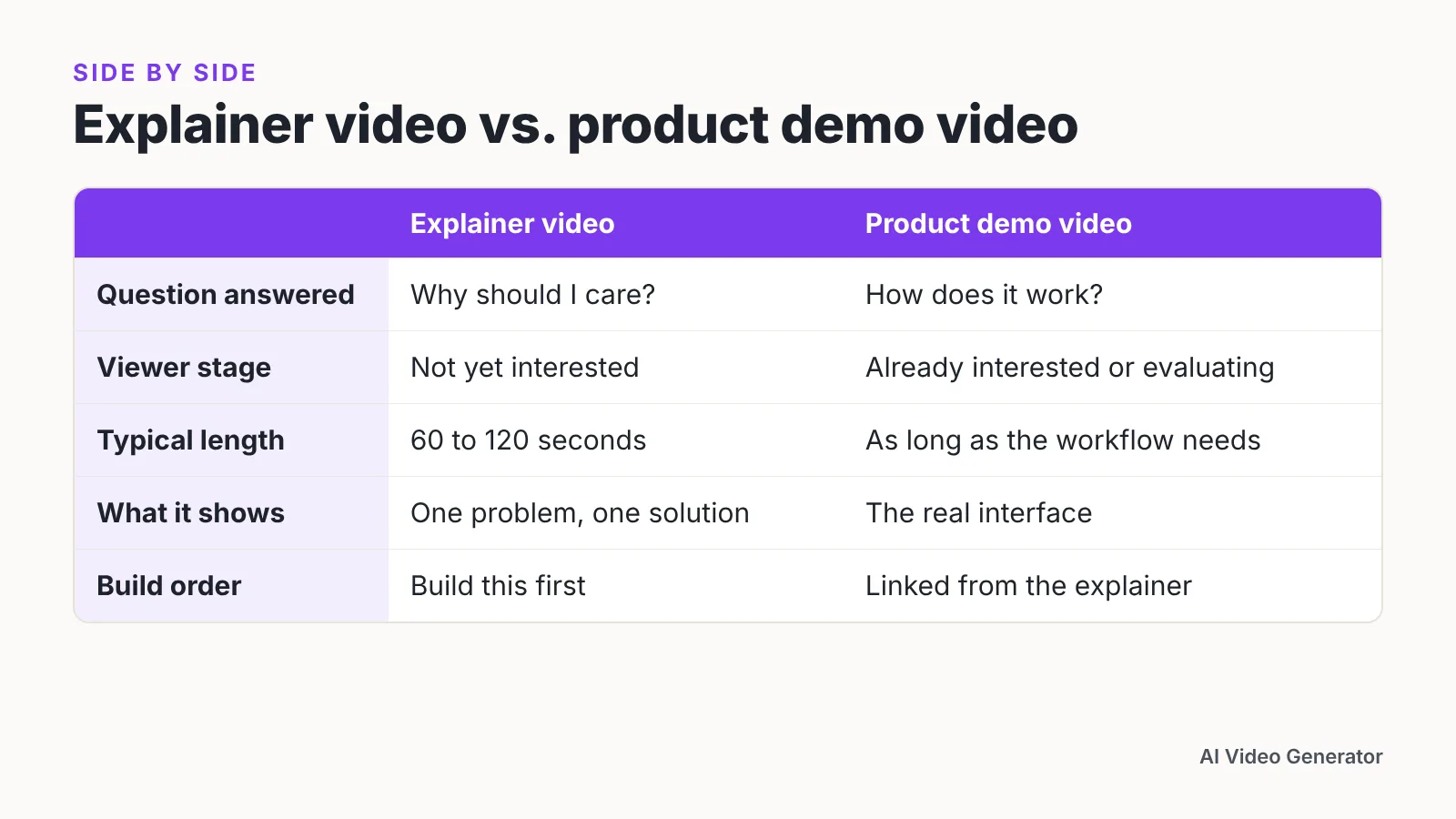
These two get confused constantly, and the confusion costs conversions. A demo answers "how does it work?" for someone already interested. An explainer answers "why should I care?" for someone who is not yet.
| Explainer video | Product demo video | |
|---|---|---|
| Audience | Cold or warm, often first visit | Evaluating, often in a trial |
| Core question | Why does this matter to me? | How exactly does this work? |
| Typical length | 60–120 seconds (Wyzowl) | As long as the workflow takes |
| Visuals | Abstracted, illustrated, or selective | Real interface, real data, real clicks |
| Where it lives | Homepage, paid ads, sales email | Pricing page, trial onboarding, sales call |
| Success metric | Click-through, sign-up, reply rate | Activation, feature adoption, deal velocity |
Many teams try to merge them and end up with a four-minute video that is too detailed for a homepage and too shallow for a buyer in week two of a trial. Build the explainer first, then let it link to the demo.
Where businesses use explainer videos: website, ads, sales, onboarding and training
- Homepage and product pages. Place it above the fold with a poster frame showing a face or the product, and autoplay muted with captions on.
- Paid ads. Cut a much shorter version from the same script; the hook becomes the whole ad.
- Sales outreach. Embed a thumbnail in the email body so a prospect can understand your pitch before a call, not during it.
- Onboarding and support. Replace the paragraph nobody reads in your welcome email with a 60-second walkthrough of the first task.
- Internal training. Use one explainer per policy change, kept short enough to watch between meetings.
According to Wyzowl, 93% of video marketers say video has helped increase users’ understanding of their product or service. When asked how they would prefer to learn about a product or service, 44% of people chose watching a short video over any other format, Wyzowl reports.
Track one number per placement. A homepage explainer is working if sign-ups rise, not if play count rises.
How to choose your format: a five-question checklist
- Who is watching, and how cold are they? Cold traffic needs the problem framed first — motion graphics or live action. Trial users need the screen.
- What is the proof? If proof lives in an interface, use a screencast. If it lives in a person’s expertise, put a human or avatar on screen.
- How often will this change? Quarterly pricing updates favor formats you can re-render — avatar or text-to-video — over live shoots.
- How many languages do you need? Multilingual rollouts push you toward synthetic voiceover and on-screen text you can swap.
- What is your real budget — money and calendar? Live action needs people and a shoot day. Animation needs a designer. Screencasts need a quiet hour and a clean test account.
Answer all five before you open an editor. The format that satisfies the most constraints wins; the one that merely looks impressive usually stalls in production.
Frequently asked questions
How long should an explainer video be?
Explainer videos typically run between 60 and 120 seconds, according to Wyzowl. Shorter is safer for cold traffic: Vidyard’s benchmark data shows 65% of viewers stay engaged to the end of a video under one minute, compared with 20% for videos over 20 minutes.
Are explainer videos still worth making?
Wyzowl’s State of Video Marketing 2026 data shows 68% of video marketers have made explainer videos, making it the most popular video marketing use case. Wyzowl also reports 93% of video marketers say video has helped increase users’ understanding of their product or service.
What’s the difference between an explainer video and a product demo?
An explainer answers "why should I care?" for someone who may be seeing you for the first time, usually in 60 to 120 seconds per Wyzowl. A demo answers "how does it work?" for a buyer already evaluating, using the real interface and taking as long as the workflow needs.
Which explainer format works best for software?
Screen-based formats usually win because the proof is on screen. How-to videos are Wistia’s highest-engaging category, with sub-one-minute how-tos reaching an 82% engagement rate and 5–30 minute how-tos holding at 58%, which supports short, procedural walkthroughs over abstract animation.
Can I make an explainer video without a camera crew or voice actor?
Yes. Text-to-video and AI avatar platforms generate narration and on-screen presenters from a script, which makes re-cutting cheap when pricing or features change. The trade-offs are real: an avatar reading to camera offers little visual variety, the script still has to be written by a person, and it cannot show a live interface — so pair it with screen recordings when the proof is on screen.
Sources
- The Explainer Video Effect: Turn Clicks into Customers — Wyzowl
- 16 Benefits of Video Marketing — Wyzowl
- Wistia’s 2025 State of Video Report Shows Use of AI in Video Production More than Doubled Over Last Year — PR Newswire
- How to Choose the Right Marketing Video Length for Any Goal — Wistia
- Video in Business Benchmark Report — Vidyard
Written with AI assistance and fact-checked against the sources cited above before the AI Video Generator Editorial Team published it.